The tool
Your property’s shared calendar
What’s coming up at the property, visible to every department in one place.
Group arrivals, works, closures, deliveries, and inspections get entered once. Housekeeping, maintenance, and breakfast see them without anyone doing the rounds of the offices.
Included with any subscription, whatever the number of tools you choose. See pricing.
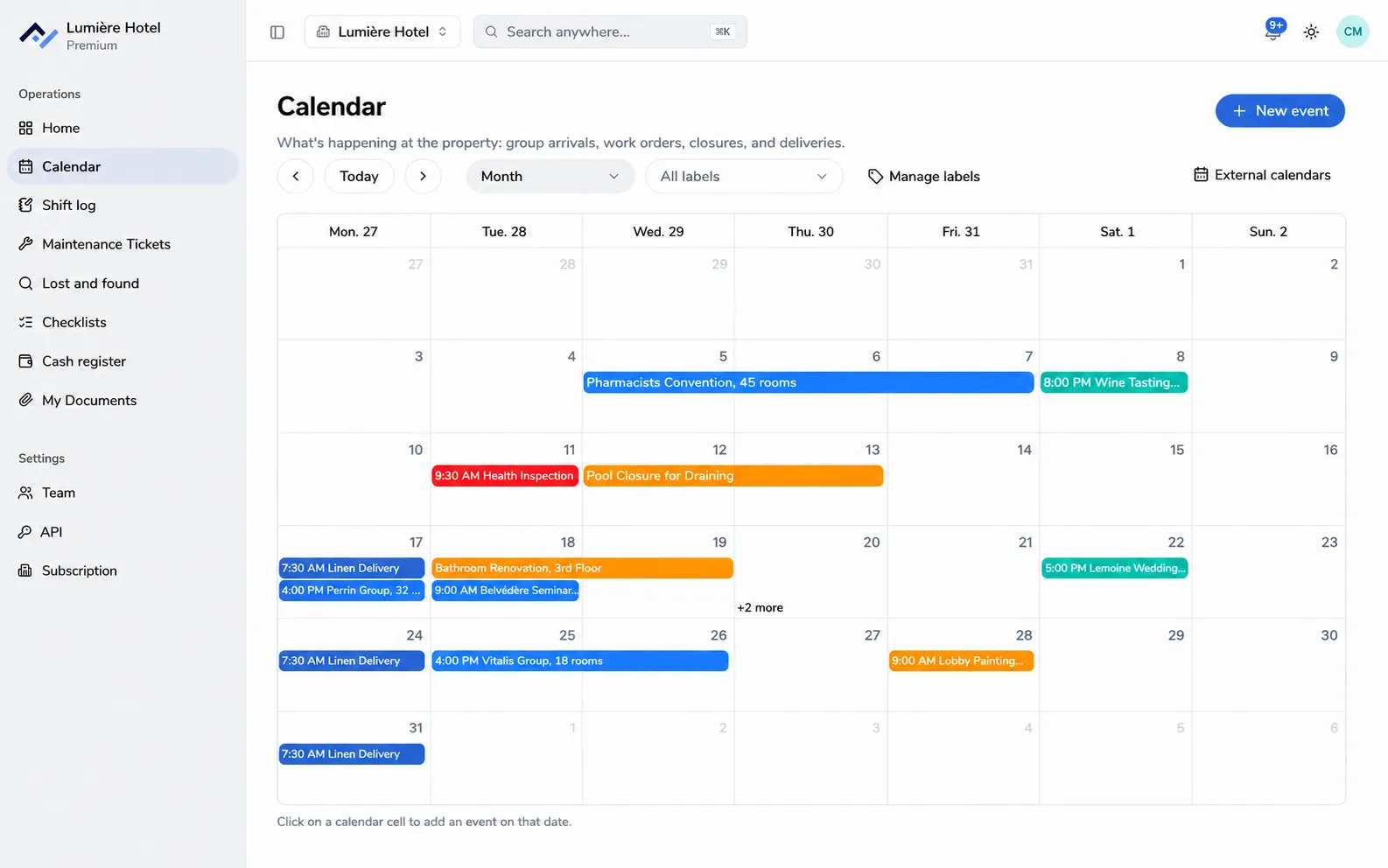
What the tool does
No more whiteboard in the office and dates circulating by email. One calendar per property, kept up by the people who work there.
Add an event in one click
Click a day to add what’s planned: a title, location, time, or all-day. A group booking spanning two days shows on both.
Colour labels created by your team
Groups, works, inspections, events: labels are free-form, colour the calendar, and let you filter the view.
Repeating events get set up once
Daily, weekly, monthly, or yearly. A single occurrence can be removed on its own, without breaking the series.
A reminder before it’s due
An event can notify the team before it starts, on the phone as well as in the browser.
Connect to existing calendars
The calendar can import an outside calendar and publish to another tool, using the standard calendar format.
Included with any subscription
The shared calendar isn’t an option to tick: it comes with your subscription, even if you only open a single tool.
- Included from your first tool, at no extra cost.
- A calendar visible to the whole team, with no account limits.
- Labels, repeating events, and reminders before deadlines.
- A connection to the calendars you already use.
Questions about the calendar
Is this a staff schedule?
No, and that’s deliberate. The calendar carries the life of the property: groups, seminars, works, closures, deliveries, inspections, events. Who’s working when is a job for a scheduling tool, with its own rules.
Who sees the calendar?
The whole team at the property. That’s the point: the front desk, housekeeping, maintenance, and breakfast all see the same group arrival.
Can you connect a calendar you already use?
Yes. The calendar can import an outside calendar and publish to another tool, using the standard calendar format. Whatever already exists elsewhere doesn’t need to be re-entered.
Do events that repeat every week have to be re-entered by hand?
No. An event can repeat daily, weekly, monthly, or yearly, and a single date can be removed from the series without touching the rest. The Monday linen delivery gets set up once.
The whole property on the same calendar
Create your property, add what’s already planned, and the whole team can see it as soon as tomorrow. 6-month free trial, no card required.